Fake Payment Email Scam: Protect Your Business from Phishing Threats
=====================================================================
Fake Payment Email Scam pretending to be payment alerts, cloud storage warnings, or account suspension notices are becoming more advanced and more dangerous. These emails are designed to create panic and trick users into clicking malicious links that steal credit card numbers, usernames, and passwords. Emails claiming your cloud storage, email account, or subscription is about to expire are one of the most common phishing scams circulating today. Below, we break down exactly how these scams work, how to identify them, and what to do to protect yourself or your business.
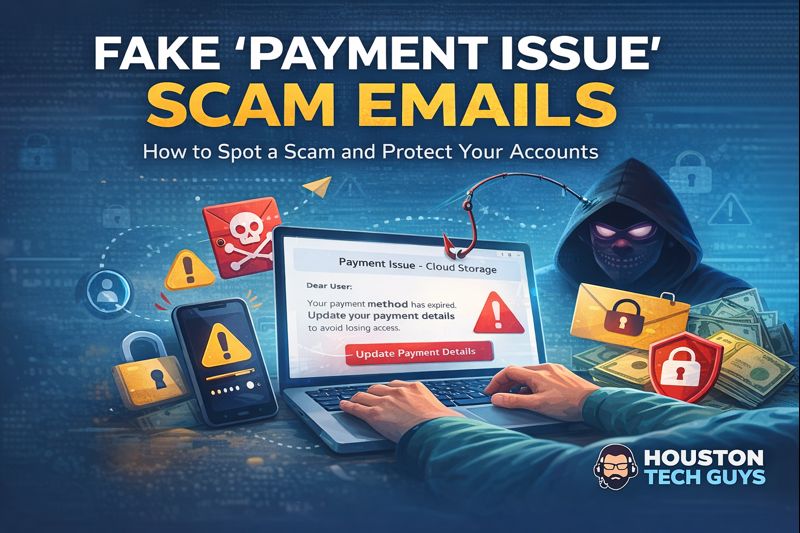
This image shows a fake “Payment Issue – Cloud Storage” email designed to look legitimate. Scammers use urgent language, fake subscription details, and bold buttons like “Update Payment Details” to pressure users into clicking. The formatting looks professional, but the goal is to steal sensitive information.
How Fake Payment Email Works
Scammers send emails that appear to come from trusted companies such as cloud storage providers, email platforms, or subscription services. These messages often include:
- Claims that your payment failed or expired
- Threats of losing photos, files, or access
- Urgent deadlines
- A large button asking you to update payment information
Once clicked, the link sends you to a fake website that captures everything you type.
What You Should NEVER Do
- Never click links inside unexpected payment or security emails.
- Never enter your credit card information from an email.
- Never enter your email or account password through an email link.
- Never trust emails that pressure you to act immediately.
Legitimate companies do not ask for sensitive information through email links.
This image shows the technical email header information, including SPF, DKIM, and DMARC results. While the email may appear to pass certain checks, failures in DKIM and DMARC are strong indicators of a spoofed or fraudulent email. These details confirm the message did not come from a legitimate sender.
How to Check If an Email Is Legitimate
Always inspect the sender’s email address. Scam emails often come from random or suspicious domains that do not match the company’s official website.
Examples of fake senders:
- payment_declined@randomdomain.xyz
- billing@cloud-alerts.net
Legitimate companies use their official domains only. For example, @ google.com , @ Microsoft.com , @ Yahoo.com .
If the sender address looks unusual, misspelled, or unrelated to the company name, the email is not legitimate.
Hover Over Links (Do Not Click)
On a computer, hover your mouse over the button or link. If the destination does not match the official website, it is a scam.
Common Red Flags
- Generic greetings like “Dear User”
- Threats of immediate account loss
- Requests for credit card or login details
- Poor grammar or odd wording
- Links that do not match the company domain
What To Do If You Receive an Email Like This
- Do not click anything.
- Close the email immediately.
- Open a new browser window.
- Manually type the company’s official website.
- Log in and check your account directly.
If there is a real issue, it will appear inside your account dashboard.
How Houston Tech Guys Can Help
If you are unsure whether an email is real or fake, do not guess. Houston Tech Guys can:
- Verify suspicious emails
- Analyze links safely
- Secure compromised accounts
- Enable multi-factor authentication
- Protect personal and business data
Contact Houston Tech Guys
Website: https://www.HoustonTechGuys.com
Email: info@houstontechguys.com
Phone: 713-849-2953
Verify independently and respond to exposure
Treat phone numbers, sender names and amounts described here as details reported in the source case, not proof of who owns a number or who placed a call. Caller ID and email sender displays can be spoofed. Open the organization’s official app or type its known website yourself; use contact information obtained there, not from the message. Do not share passwords, recovery codes or unexpected sign-in approvals. If you shared access or credentials, disconnect an exposed device, use a different trusted device to change passwords and review sessions, and contact the affected bank or service promptly. Keep evidence and report the message. A suspicious message alone does not prove a device or account was compromised.